Industrial Control & IIoT Platform

The entire control stack,
engineered end to end.

Full stack a live path from field sensor to phone — and back one naming chain across six layers a panel drawn from BOM to wiring Ignition SCADA over OPC UA a Unified Namespace on Sparkplug B a bounded AI optimizer — prototype, advisory-only

A real industrial bench — Allen-Bradley PLC, PowerFlex VFD, Opto 22 edge I/O, Ignition SCADA and a Unified Namespace — wired and commissioned by one engineer, carrying live data up to the Atomate app, a React Native Industry 5.0 IIoT companion that reads the bench live and commands it back down — every layer speaking the same names.

6Layers, field to cloud
5Industrial protocols
100%Real bench data
1Engineer, end to end
IIoT Architecturehover a node →
EtherNet/IP OPC UA OT LAN Sparkplug B MQTT · WSS
scroll ↓
The architecture

From a sensor on the panel to your phone — and back.

Field I/O rises through a CompactLogix PLC, an Opto 22 groov RIO running Node-RED, and a Sparkplug B Unified Namespace on HiveMQ — into Ignition SCADA, a cloud worker, and the app. Commands take the one path back down, clamped at every step, to where the PLC has the last word.

One metric · one name · every layer

Follow SpeedCmdPct down the stack — nothing renamed, nothing abbreviated. It's generated from one spec and re-checked on every commit, so the field and the phone can never drift apart. That discipline is what makes the round trip safe.

Cloud
App · AI
Live data & control, on a phonespeedcmdpct
Every reading and command, keyed by the same tag names as the PLC — a bounded optimizer (prototype) rides on top.React NativeSupabase
Broker · UNS
One namespace for the whole benchspBv1.0/Bench01Lab/…/Drive01
Every layer publishes to and reads from one cloud namespace — device birth/death and commands built into the protocol.Sparkplug BMQTT / WSS
Edge
Field data, encoded for the cloudDrive01.SpeedCmdPct → Sparkplug B
Node-RED reads the PLC over CIP, encodes Sparkplug B, and pushes it up over a secure link.Node-REDTLS 8883
SCADA
Operator screens & a live tag modelBench01/Drive01/SpeedCmdPct
The same tags on a wall display, bound straight to the PLC over OPC UA.OPC UAIgnition
Control
Drives the motor, guards the envelopeDrive01.SpeedCmdPct
The PLC runs the drive and checks every incoming setpoint against min/max, rate and dwell limits before it moves.Studio 5000EtherNet/IP
Field · I/O
Sensors, buttons & lights on the panelphysical origin
E-Stop, start/stop, four status lights and a small motor, wired on 24 VDC — where the name begins.24 VDCNFPA 79
Field · the bench
The physical bench

A real panel — from bill of materials to wiring to commissioning.

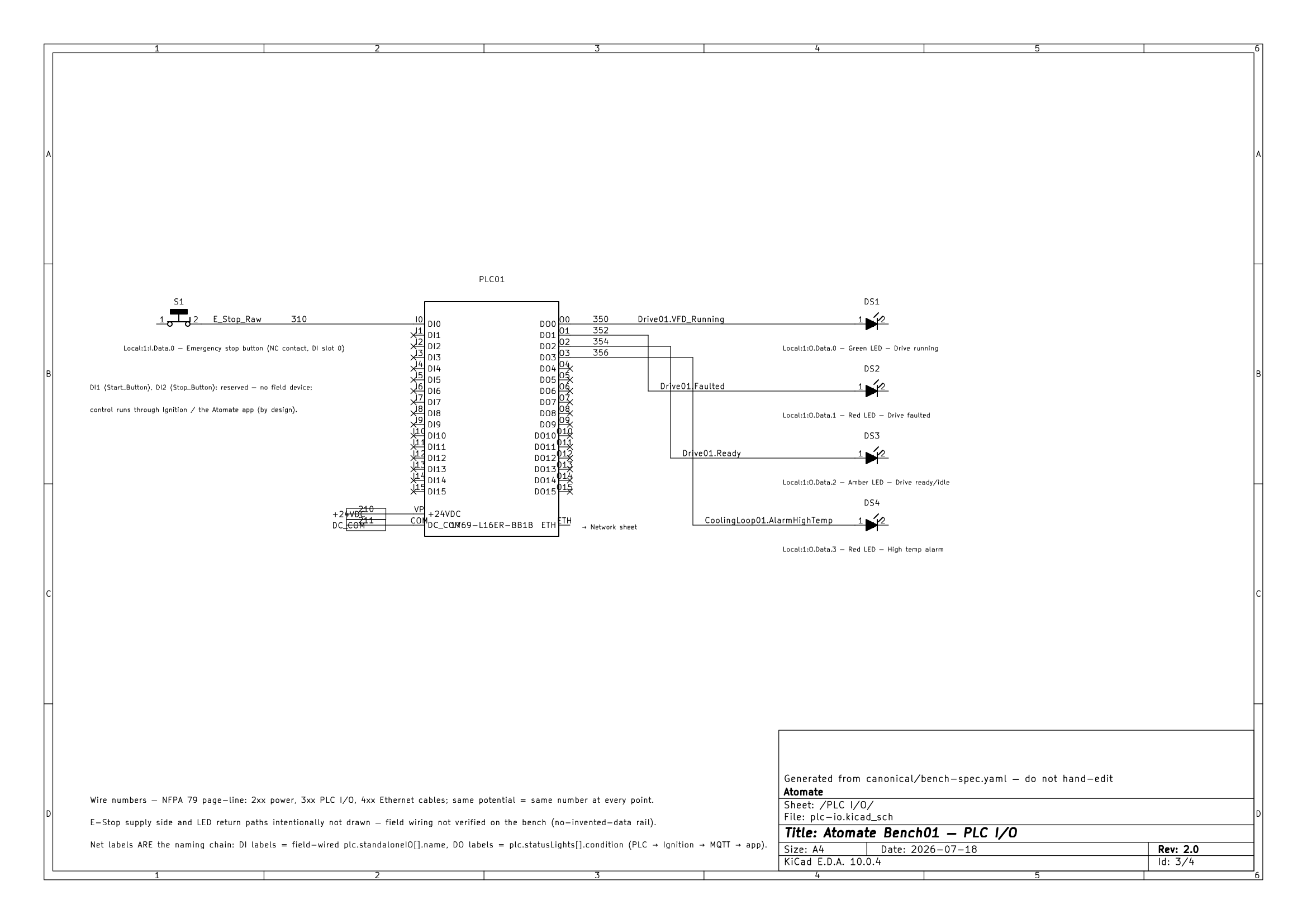
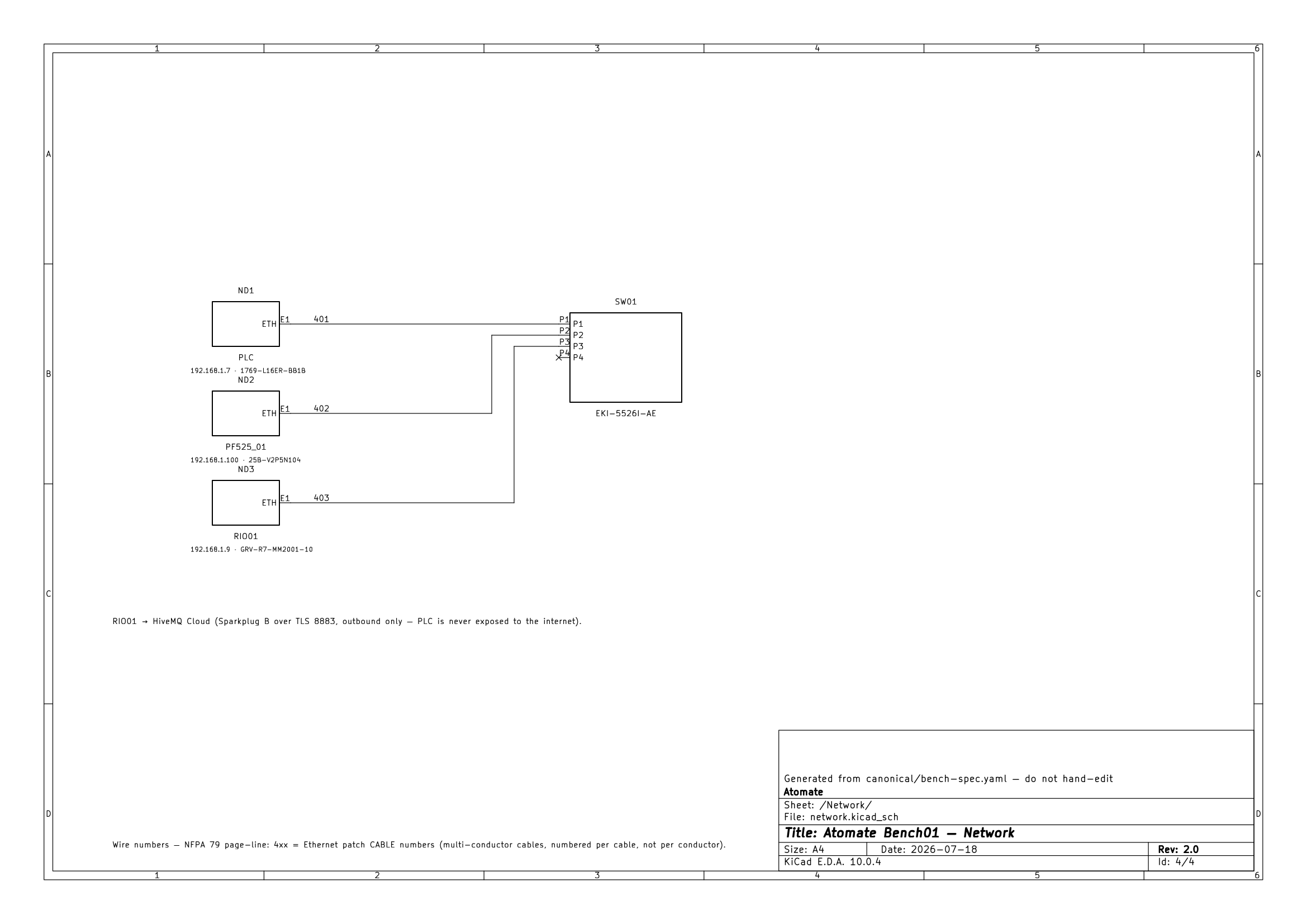
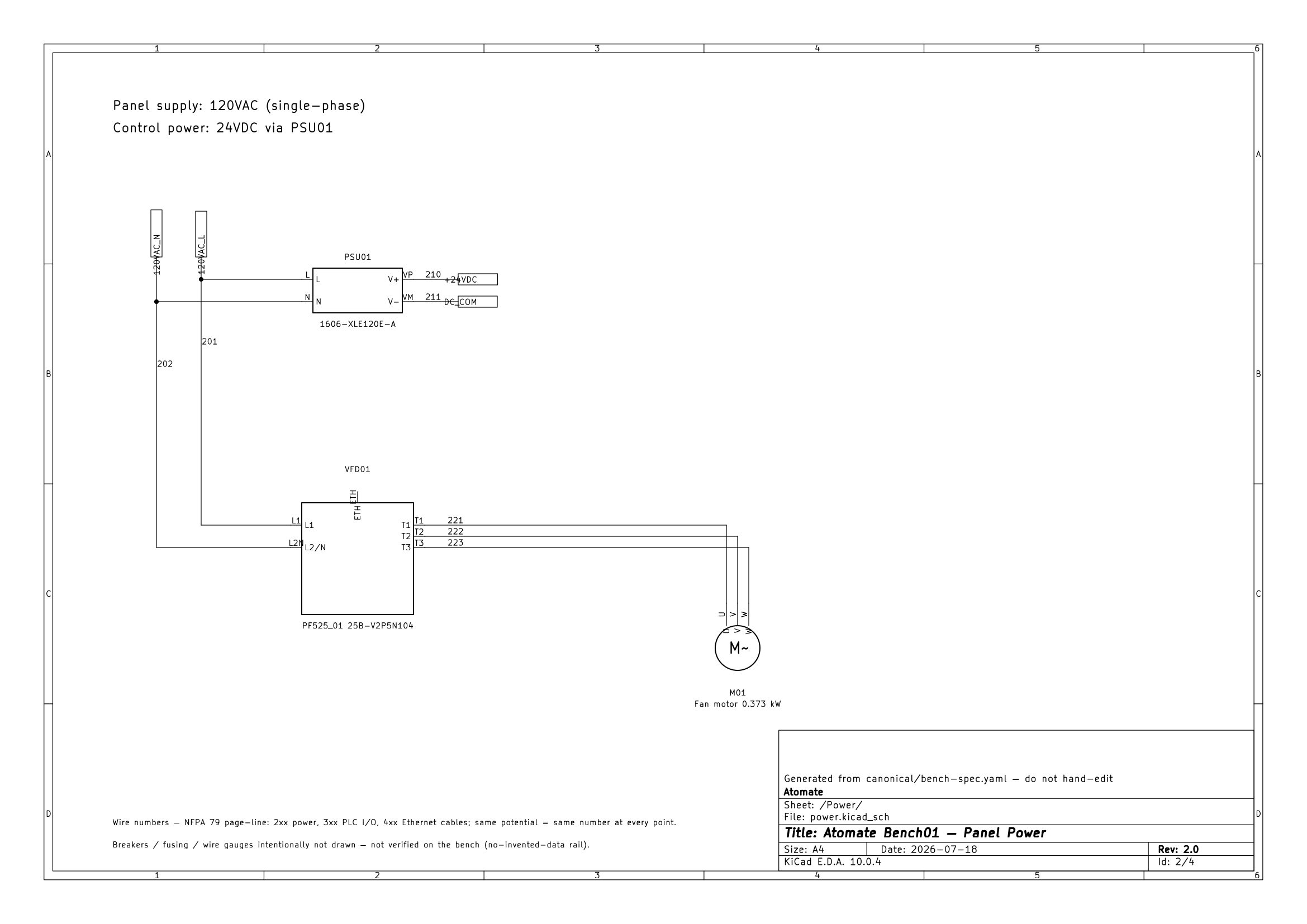
One engineer took this from a parts list to a live bench: BOM → KiCad schematic → wired panel → commissioned. The electrical drawings are generated from bench-spec.yaml too — the net labels on the sheet are the same names that reach the app.

SheetPanel Power Bench01 · Rev A · generated from bench-spec.yaml
Panel power schematic
120 VAC → 24 VDC (PSU 1606-XLE120E-A) · PowerFlex 525 → 0.249 kW motor · wire numbers per NFPA 79
PLC I/O schematic
E-Stop, start/stop & four status lights · net labels ARE the naming chain (DO = plc.statusLights[].condition)
Network schematic
PLC · PF525 · RIO on one managed switch → HiveMQ Cloud over Sparkplug B / TLS 8883 · the PLC is never exposed to the internet
Bill of materialsBench01Lab
PLCCompactLogix 5370 L11769-L16ER-BB1B
DrivePowerFlex 525 VFD · EtherNet/IP25B-V2P5N104
Edge I/OOpto 22 groov RIO · Node-REDGRV-R7-MM2001-10
PowerAllen-Bradley 24 VDC PSU1606-XLE120E-A
SwitchAdvantech Ethernet switchEKI-5525
BrokerHiveMQ Cloud · Sparkplug BTLS 8883 / WSS 8884
The app

The whole bench, live in your pocket.

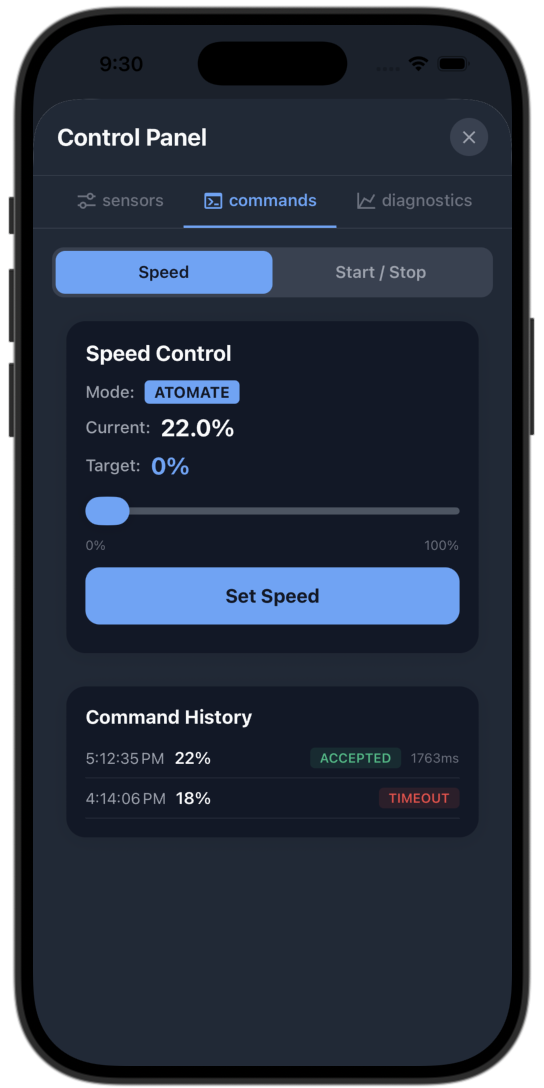
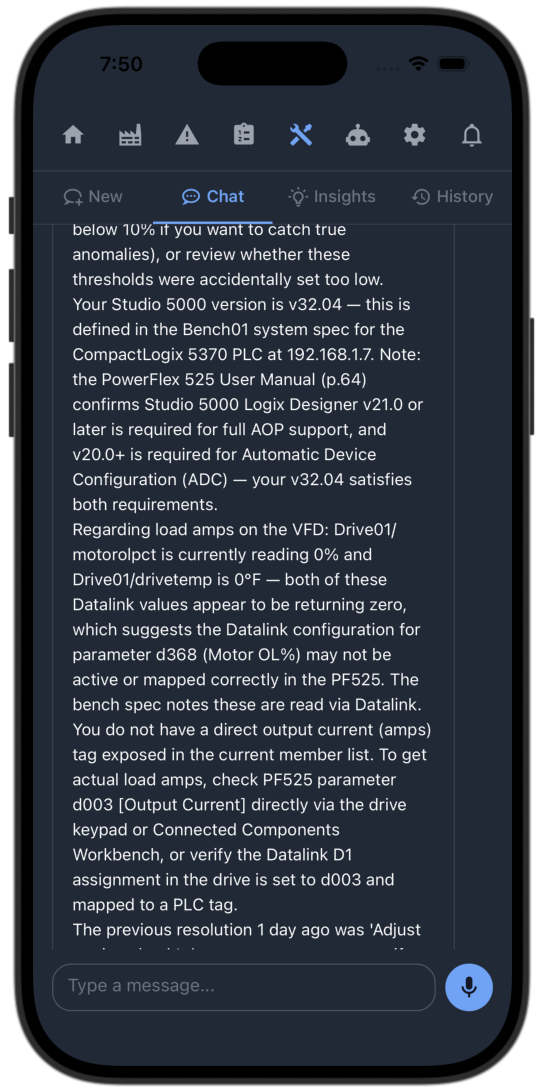
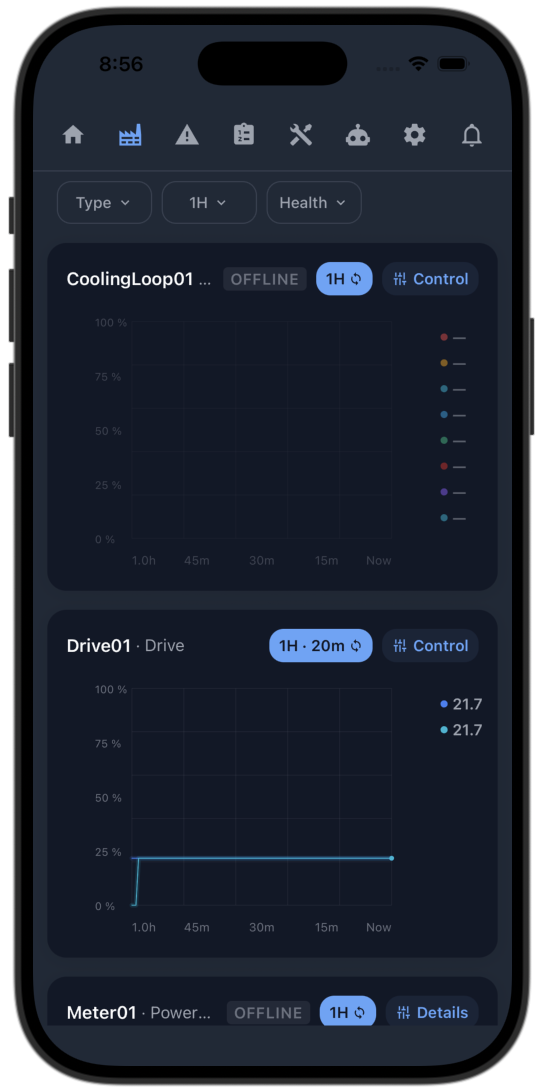
Every screen reads straight from the bench and is keyed by the exact same tag names as the PLC — live sparkline charts, per-device control, AI troubleshooting grounded in the equipment manuals, and a tap-to-apply optimizer.

Live fleet — a sparkline chart on every device card Per-device control panel AI troubleshooting grounded in the equipment manuals Tap-to-apply optimization — return-on-investment view
  • Fleet · live sparklines Your whole bench at a glance

    Every device card carries a live sparkline chart, streaming straight from the bench — and anything not wired yet says OFFLINE, honestly.

  • Control · per-device Live control, safely bounded

    Start, stop and set speed for any device — every command clamped to the limits the spec declares.

  • Troubleshoot · AI + manuals Fault help from the real manuals

    Ask what a fault means in plain English — the answer is grounded in the actual equipment manuals, with the pages cited.

  • Optimize · tap-to-apply Energy savings, one tap away

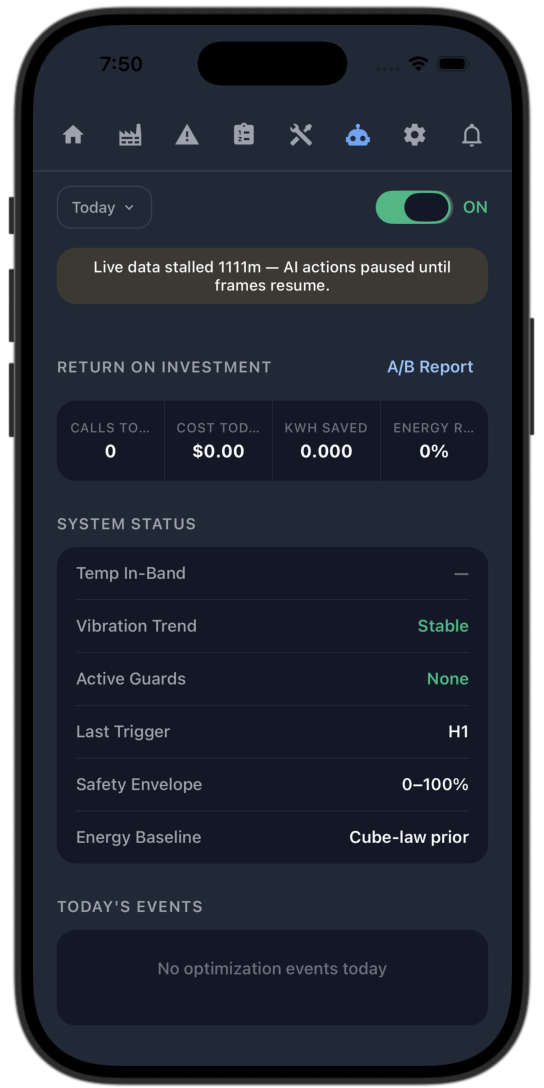
    The optimizer (prototype) frames energy it could hand back as a percentage and waits. You tap Apply — it never touches the controls on its own.

Bounded AI optimization · prototype

A bounded optimizer — and it can't run away with it.

Still a prototype: a cloud worker reads the live snapshot and proposes an energy trim on the affinity law — advisory-only, clamped to limits the spec declares, with the PLC as the last word. And because the power meter isn't wired yet, the savings are a modeled estimate, not a measured result. The interesting part isn't the AI — it's the rails around it.

Bounded optimizer Advisory — waiting for Apply
  1. 01Watch
    reads the live snapshot snapshot in · Drive01 · 23 metrics
  2. 02Detect
    frames a % it can hand back headroom on the affinity law · 27%
  3. 03Decide
    proposes — clamped to spec target 82% · clamped at the spec floor
  4. 04Act
    one dispatcher publishes DCMD published · single path to the PLC
Drive speedproposal clamped to the spec floor
min · spec floor max PLC now AI wants
The guardrails
01

Advisory by default

It surfaces a %-framed energy opportunity and waits. You tap Apply — a human stays in the loop.

02

Bounded, not free

Every setpoint it can touch is clamped to a min/max declared in the spec. It physically cannot exceed them.

03

PLC-authoritative

One advisor, never a second hand on the controls. The physical E-Stop and local override always win.

04

One dispatcher

Exactly one path issues a drive command. The optimizer can never fork into a competing hand on the machine.

The PLC always has the last word. The AI only ever asks.

The engineer · get in touch

Built end to end by one person.

I'm Adam Ramirez — I build industrial automation across the whole stack: the control panel (PLC, VFD, and the electrical design from BOM → schematic → wiring → commissioning), the IIoT architecture that carries it field-to-cloud, and the React Native app that connects live to the bench.

One naming chain, held identical across six layers from a single canonical spec — the discipline that keeps a phone and a PLC in lockstep, and makes it safe to put a bounded AI optimizer (a prototype, for now) anywhere near a control system.

Studio 5000EtherNet/IPKiCadIgnitionOPC UA Sparkplug BNode-REDReact NativeSupabase
adam@atomatesystems.com

Repository is private — happy to walk through the architecture on request.